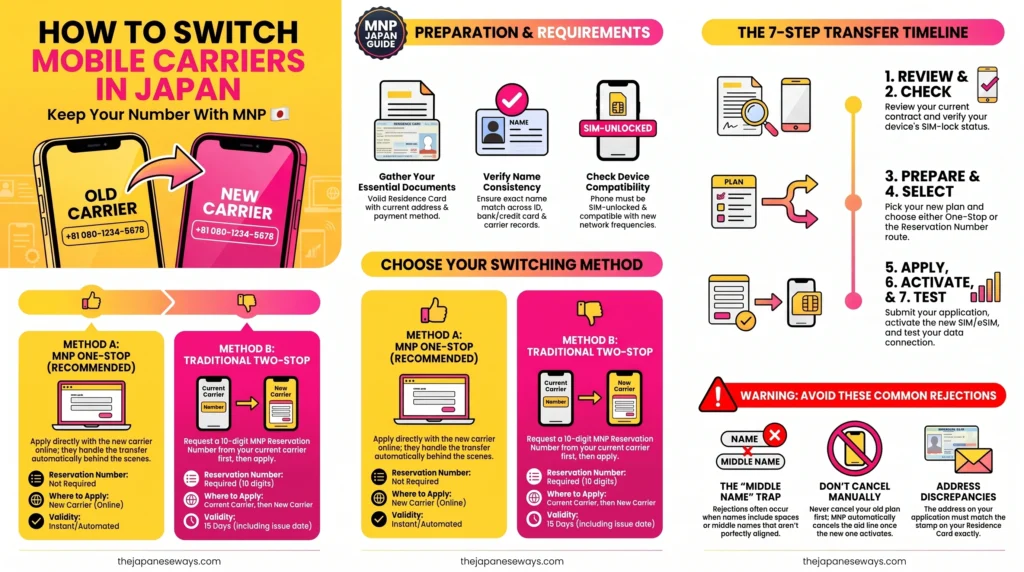
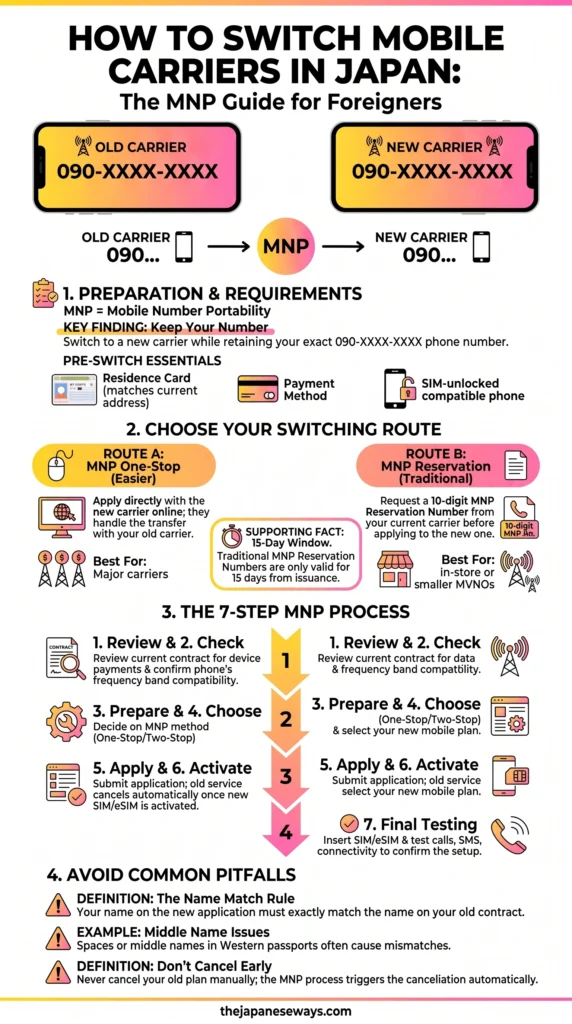
“Want to change mobile carriers in Japan but keep your current phone number? That’s what MNP is for.”
Mobile Number Portability (MNP) is the system that allows you to switch your service provider without the headache of changing your phone number. You get to keep your 070, 080, or 090 number while moving to a better plan.
PR
As of July 2026, the process of using an mnp japan guide to switch mobile carrier japan has become significantly easier for foreign residents. Legislative changes and new systems like “MNP One-Stop” have removed many of the old bureaucratic hurdles that used to require hours of waiting in a physical shop.
This guide provides everything you need to navigate the transition smoothly and save money on your monthly bill. Whether you are a student, a long-term resident, or a professional, understanding these technical nuances will save you from the “roaming traps” and administrative fees common in the Japanese market.
What Is MNP in Japan?
MNP (Mobile Number Portability) is a technical service allowing you to migrate your existing phone number between different mobile network operators. Instead of canceling your current contract and losing your 070/080/090 number, you “port” your identity to a new carrier. This ensures you remain reachable by contacts and maintain access to critical verified services.
The primary benefits of using MNP in 2026 include:
Identity Verification Preservation: In Japan, your phone number is your digital “Hanko” (seal). Banks, credit card companies, and government portals (like MyNa Portal) use your number for identity verification. Changing it requires updating dozens of institutions.
Two-Factor Authentication (2FA): Most Japanese apps, including LINE, Mercari, and banking apps, use SMS-based 2FA. Moving your number ensures you don’t get locked out of your digital life during the switch.
Avoid Contact Confusion: Informing every friend, colleague, and business contact of a number change is a logistical nightmare. MNP eliminates this entirely.
Cost Savings: By porting your number to a provider like Rakuten Mobile, you can access significantly cheaper rates while keeping your established contact point.
What You Need Before Switching
Identity verification for foreign residents in Japan remains strict in 2026. Before you begin your application, you must ensure your documents are current and match your registered address exactly. Rejections often happen because of tiny discrepancies that “Relocation Specialists” see every day.
Japan Mobile MNP Switching Guide
Pre-Switching Requirements Checklist
[ ] Current Active Phone Number: Your number must be active at the moment of transfer. Do not cancel your service before the port is complete.
[ ] Valid Identification: Your Residence Card (Zairyu Card) is the primary document. A My Number Card or a Japanese Driver’s License are also accepted.
[ ] Current Address: The address on your application must match the address printed on your ID perfectly. If you have moved recently, update your Residence Card at the ward office first.
[ ] Accepted Payment Method: A Credit Card (foreign or Japanese) or a Japanese Bank Account for direct debit.
The “Middle Name” Anxiety
A major pain point for expats is the name mismatch. Foreigners often have their Residence Card formatted as [LAST, FIRST MIDDLE]. However, your current carrier might have registered you as [FIRST MIDDLE LAST] or truncated your name.
Before you apply for a switch, log into your current carrier’s portal. Check exactly how they have spelled your name. If you apply to a new carrier using a name format that doesn’t match the current carrier’s records, the MNP transfer will be rejected automatically by the system.
Do You Need an MNP Reservation Number in 2026?
In the past, you always had to call your current carrier or visit a shop to get a 10-digit “MNP Reservation Number.” This was often a high-pressure situation where staff would try to convince you to stay.
In 2026, the “MNP One-Stop” system is the standard for online applications between major providers. This allows you to apply at the new carrier’s website without ever talking to your old provider.
MNP Methods Comparison (2026)
Method
When to Use
Common Carriers Using This
MNP One-Stop
For switching online via the new carrier’s website. No reservation number needed.
For in-person shop visits or if the old carrier is a small MVNO.
Smaller providers or “Legacy” contract types.
The “One-Stop” Redirection Nuance
Even with MNP One-Stop, the process is not invisible. During the online application with your new carrier, the website will redirect you to your current carrier’s login page.
PR
You must have your current carrier’s ID and password ready. You will log in, agree to the transfer terms, and then be redirected back to the new carrier to finish. If you have forgotten your current login credentials, the One-Stop method will fail, and you will be forced to call them to get a reservation number.
How to Switch Carriers: The 7-Step Step-by-Step Guide
Step 1: Review Your Current Contract
Check your current provider’s portal for remaining device payments. While 2026 consumer rules have essentially abolished cancellation fees (limiting them to ¥0 for almost all plans), you are still legally obligated to pay the balance of your smartphone if you bought it on installments.
If you are currently with a carrier like Docomo, be aware that visiting a shop for these procedures often incurs a ¥4,950 administrative handling fee. Doing the MNP process online is almost always free.
Step 2: Check Your Phone and SIM Lock Status
Your phone must be SIM-unlocked to work on a new network.
The Post-2021 Rule: Devices sold after October 1, 2021, are SIM-free by law. You don’t need to do anything.
iPhone Cut-offs: According to J:COM sources, iPhone 13 and newer are generally SIM-free. iPhone 12 and older models (iPhone 8, X, 11) usually require a SIM unlock via your current carrier’s website.
The VoLTE Requirement: This is critical for 2026. Older devices that do not support VoLTE (Voice over LTE) are now essentially “bricks.” Major networks are retiring older 3G and non-VoLTE 4G bands. Ensure your phone is VoLTE compatible, or you won’t be able to make calls after the switch.
Step 3: Prepare the MNP Transfer
Log into your current carrier’s portal one last time. Verify that your address is updated. If you moved from an apartment in Shinjuku to one in Setagaya but never told your carrier, the MNP transfer will be rejected because the addresses won’t match your Residence Card.
Step 4: Choose the New Plan
In 2026, you should look for “tiered” pricing. Fixed-data plans (like 20GB) often charge you the full price even if you only use 5GB. Tiered plans, like the Rakuten SAIKYO plan, adjust the price based on your actual data usage, which is much more efficient for expats who might use more data during travel but less while on home Wi-Fi.
Step 5: Submit Your Application (The eKYC Process)
This is where many foreigners struggle. Most modern applications use eKYC (AI Identity Verification) via a smartphone app.
The “Four Corners”: When taking a photo of your Residence Card, you must show all four corners. If the card is slightly cropped, the AI will reject it.
The “Thickness” Photo: You will be asked to tilt your card to show its thickness and the “hologram” to prove it isn’t a photocopy. Ensure you are in a well-lit room to avoid glare, but don’t use a direct flash which blurs the text.
Real-time Selfie: You will need to move your head or blink to prove you are a real person.
Step 6: Activate the Transfer
Physical SIM: Once it arrives (2–5 days), log into the portal and click “Start Transfer.” Your old service will die instantly, and your new service will live.
eSIM: This is the 2026 favorite. You receive a QR code or an activation profile via an app. Activation can take as little as 30 minutes.
Step 7: Test Everything
Toggle your Wi-Fi off.
PR
Check if the 4G/5G icon appears.
Open a website.
Call a local Japanese number (like a friend or a shop).
Send an SMS. If data doesn’t work, you may need to delete old “APN Profiles” if you were using a smaller MVNO before.
Japan Mobile Carrier Switch Guide
Switching to Rakuten Mobile With MNP
For foreign residents in 2026, Rakuten Mobile is the top choice. While “other carriers” often have high base fees and Japanese-only interfaces, Rakuten has leaned into the expat market.
The Benefits of Rakuten Mobile in 2026
Rakuten SAIKYO Plan Pricing:
¥1,078 (incl. tax) for less than 3GB.
¥2,178 (incl. tax) for 3GB to 20GB.
¥3,278 (incl. tax) for unlimited data.
The Rakuten Link App Advantage: This app allows for free domestic calls to most Japanese numbers (including 03 and 06 landlines). This is a massive cost-saver when you need to call a bank or a utility company.
Superior International Roaming: Rakuten provides 2GB of high-speed data for free in 107 countries (as of April 8, 2026).
Avoiding the “ahamo Trap”: One major competitor, ahamo, offers more data abroad (30GB) but has a “15-day trap.” If you use data abroad for more than 15 days, ahamo throttles your speed to 128kbps—which is nearly unusable—until you return to Japan. Rakuten does not have this 15-day time-based throttle, making it better for longer home visits.
English Infrastructure: The “my Rakuten Mobile” app and the official website have full English support, reducing the need for a translator during the bureaucratic process.
Common MNP Mistakes to Avoid
Name/Address Mismatch: As mentioned, this is the #1 reason for failure. If your Residence Card has a middle name but your current carrier doesn’t, you must fix it at the old carrier first.
Locked Phones (Pre-2021): If you try to use an iPhone 11 from “another carrier” on Rakuten without unlocking it, you will get a “SIM Not Supported” error.
Premature Cancellation:Never cancel your old service manually. If you cancel your Docomo or SoftBank line yourself, you lose the number. The new carrier (Rakuten) will automatically trigger the cancellation of your old plan the moment the MNP port is finalized.
Blurry ID Photos: If the AI can’t read the expiration date on your Residence Card, the application will be rejected within 24 hours.
0120/0570 Numbers: Note that while Rakuten Link makes most calls free, “Navi Dial” (0570) and some special service numbers still incur charges.
How Long Does MNP Take?
The 2026 timeline is faster than ever, thanks to AI verification and eSIM technology.
eSIM: If you apply during business hours (0:00 to 21:20) and use AI eKYC, you can be activated in 30 minutes. Applications after 21:21 are processed after 9:00 AM the next day.
Physical SIM: The SIM must be mailed to your home address for security. This typically takes 2 to 5 days. You can keep using your old carrier during this waiting period; your service won’t switch until you click “Start Transfer” in the app.
Does MNP Cost Money?
In 2026, the barriers to moving have been lowered, but some “hidden” costs remain.
MNP Transfer Fees: Typically ¥0 for online transfers.
Administrative Fees: Many carriers charge an “Administrative Fee” or “Contract Handling Fee.” While Rakuten is known for being affordable, “other carriers” like Docomo charge ¥3,950 for in-store procedures.
Handset Installments: You must pay the remaining balance on your phone to your current carrier. You can usually choose to continue monthly payments or pay a lump sum.
Final MNP Checklist
Before you hit the final “Apply” button, run through this “Pre-Flight” checklist:
[ ] Check Coverage: Confirm Rakuten’s 4G/5G coverage in your specific neighborhood using their map.
[ ] SIM Unlock: Confirm your phone is unlocked or was sold after Oct 2021.
[ ] Check VoLTE: Ensure your device is 2026-ready with VoLTE support.
[ ] Match Info: Verify that your Rakuten ID info matches your Residence Card perfectly.
[ ] Login Ready: Have your current carrier’s login/password ready for the One-Stop redirect.
Conclusion
Switching carriers in Japan no longer requires a full day of “Shop Battles.” By following the Review → Prepare → MNP → Apply → Activate workflow, you can handle everything from your couch.
For the international community, Rakuten Mobile remains the strongest choice in 2026 due to its English support, transparent tiered pricing, and the free calls provided by the Rakuten Link app. When you factor in the 14,000-point referral bonus and the lack of a “15-day roaming trap,” it is the most logical move for any expat looking to optimize their life in Japan.
FAQ
Can I use my foreign phone?
Yes, most modern iPhones (iPhone 13+) and flagship Androids work perfectly. However, you must ensure your phone supports Japanese frequency bands. Specifically, Bands 1, 3, and 18/26 are critical for Rakuten. If your phone was bought in a region that lacks these bands, you might experience “dead zones” inside buildings.
Can I get a number without a Residence Card?
No. For any voice-enabled contract plan in Japan, a Residence Card is a legal requirement. If you are a tourist or on a short-term visa, you are limited to data-only prepaid SIMs or roaming from your home country.
Is Rakuten Link really free?
Yes, for most standard domestic numbers. It includes 070/080/090 mobile numbers and 03/06 landlines. It is also free to call back to Japan from 107 countries. However, calling foreign numbers (e.g., calling a US number from Japan) requires a separate paid “International Calling” option.
What happens to my old carrier emails?
If you use an email like @docomo.ne.jp or @softbank.ne.jp, you will lose access the moment you switch. While some carriers now offer a “carrying service” for a monthly fee (approx. ¥330), it is much better to migrate all your accounts to a free service like Gmail or iCloud before you start the MNP process.
PR
Is there a cancellation fee?
For almost all plans signed or renewed after 2022, the cancellation fee is ¥0. However, if you are on a very old “Legacy” contract from five or more years ago, there might be a small residual fee. Check your portal to be 100% sure.
Can I choose my new phone number?
With MNP, the whole point is to keep your current number. If you were to apply for a new number instead, Rakuten offers a “Selectable Phone Number” service for a ¥1,100 fee where you can choose the last four digits, but this does not apply to MNP transfers.