If you have a Rakuten Credit Card in Japan, there is a good chance you have never actually seen your most recent transactions, not because you haven’t looked, but because the default view only shows settled transactions, which are typically 2 to 3 days old. The moment you swipe your card at a store, that charge does not immediately appear in your statement. It goes through an authorisation process first, and only shows up after it has been fully confirmed by the merchant.
For most people, this delay is invisible. You log into the Rakuten Credit Card app, check your statement, and everything looks normal. What you don’t realise is that you are looking at old data. Your lunch from today? Not there yet. The convenience store run this morning? Still pending in the background.
PR
This is especially frustrating for people who do not speak Japanese and are already navigating an unfamiliar financial system. But here’s the good news: there is a built-in feature in the Rakuten Credit Card App that shows you near-real-time transaction data, and most people have never used it.
The fastest and most reliable way to check recent transactions is directly inside the 楽天カードアプリ (Rakuten Credit Card App). This is the official Japanese-language app, and it includes a dedicated section called ご利用のお知らせ (Card Usage Notifications) that shows authorized transactions, charges that have been flagged at the point of sale but have not yet been fully settled into your statement.
Download and log in to the Rakuten Credit Card App:
⚠️ Important: The ご利用のお知らせ(Notice of use) feature is currently only available in the main 楽天カードアプリ (Japanese app). It is not available in Rakuten Credit Card Lite (the English-language version of the app). If you have been using Rakuten Credit Card Lite, you will need to download the main Japanese app to access this feature.
Here’s where to find the feature:
Open the Rakuten Credit Card (楽天カードアプリ) on your phone
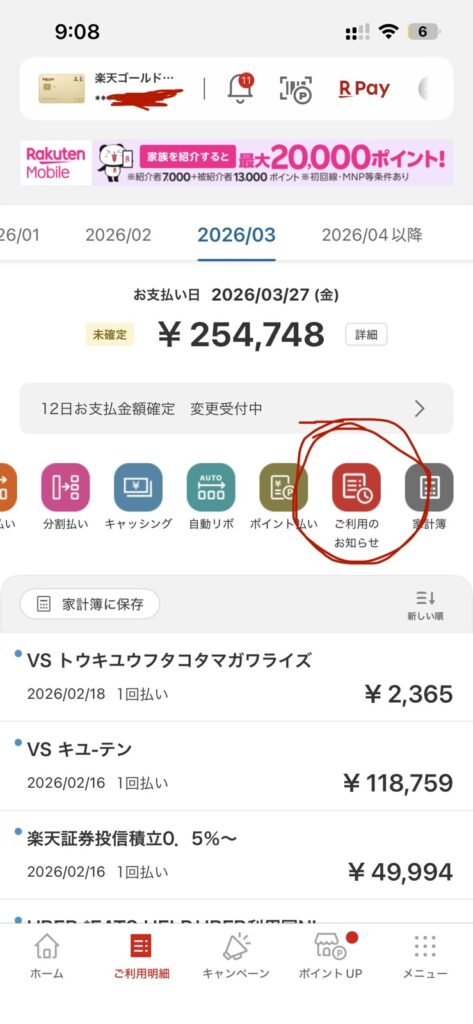
Tap ご利用明細 (Usage Details) at the bottom navigation
Look for the ご利用のお知らせ icon, it’s the red icon shown circled in the screenshot below
Tap it to see your most recent transactions, often within minutes of the purchase
What You Can See in ご利用のお知らせ:
✅ Recent authorized (pre-settled) transactions, visible within minutes of your purchase
✅ Merchant name, date, and amount for each transaction
✅ Transactions not yet in your main statement, this is the key difference
✅ Immediate fraud detection, if you see a charge you don’t recognize, you can act immediately rather than waiting 2-3 days
Think of ご利用のお知らせ as your live feed of card activity, while the normal statement (ご利用明細) is the official record that arrives a few days later.
If you prefer not to check the app manually, you can set up email notifications that alert you automatically each time your card is used. Rakuten Credit Card offers two levels of email alerts:
Type
Speed
What It Includes
Card Usage Notification Email (通常版)
~2 days after use
Full details: merchant name, amount, date
[Breaking News] Card Usage Email (速報版)
As early as the next day
Quick alert: amount + cardholder name
The 速報版 (Breaking News version) is the one you want, it sends you an email as soon as the authorization goes through, often hours before the charge even appears in your statement.
Set the [Breaking News] version to Receive as well
Enter your email address and submit
💡 Note: You must register for the standard notification email first before you can enable the Breaking News version, it cannot be used as a standalone option. Also note that alerts are not sent for transactions under ¥500, and some recurring utility bill charges may not trigger notifications.
Why This Matters: The Real Value of Seeing Transactions in Real Time
You might be thinking: “My statement shows up in a couple of days anyway, so why does this matter?” Here are three very real reasons:
🛡️ 1. Catch Card Fraud Before It Escalates
Credit card fraud is immediate. If someone steals your card details and makes an unauthorized purchase, that transaction happens in seconds. If you only check your statement every few days, a fraudster has a 2-3 day window to keep spending. With real-time visibility, you can spot the problem immediately, call Rakuten to freeze your card, and limit the damage.
💰 2. Stay on Top of Your Budget
When you check your statement at the end of the week and it’s already 2-3 days behind, budgeting becomes guesswork. You have already made purchases you can’t see yet. Having a real-time view of your spending helps you stay within limits and make better financial decisions day to day.
🌏 3. Peace of Mind for Non-Japanese Speakers
Navigating Japanese financial services without fluency in Japanese is stressful. The Rakuten e-NAVI portal has dozens of menus, and the statement page can be confusing. A simple notification showing the merchant name, date, and amount in the app gives you a quick, understandable snapshot of what was charged, without having to dig through the interface.
Quick Summary
Method
Where
How Fast
Best For
ご利用のお知らせ (App)
楽天カードアプリ
Near real-time
Instant manual check
Breaking News Email (速報版)
Rakuten e-NAVI
Same day / next day
Automatic push alerts
Standard Statement (明細)
App or e-NAVI
2-3 days
Full settled records
Both methods are completely free and take just a few minutes to set up. If you have a Rakuten Credit Card, there is no reason not to have both enabled. The combination of the app’s real-time view and email alerts gives you full visibility over your spending, something most Rakuten Credit Card holders in Japan are missing out on.
Have questions about living in Japan, managing your Rakuten Credit Card, or navigating Japanese financial services in English? Drop a comment below or reach out through the contact page.